
Table of Contents
- Introduction
- Start with the Job, Not the Instrument
- The Main Instrument Categories
- Selection Criteria
- Comparison Table
- Questions to Ask Every Vendor
- Common Buying Mistakes
- Conclusion
Introduction
Purchasing an ultrasonic flaw detector is more complicated than it first appears. The tool you select determines the methods your team can provide, the codes you can adhere to, the speed at which you can inspect, and the strength of your reports. An inexpensive device that is unable to fulfill a client’s procedure is costly. So is a sophisticated phased array system that sits in its case because no one is trained to use it.
Buyers comparing instruments can use this guidance. It lays out the important criteria, presents a side-by-side comparison of the major instrument categories, and provides you with a list of questions to ask each vendor before you sign.
How this guide is written. We don’t name or rank products. Every instrument is judged against the same stated criteria: channels and pulser-receiver performance, phased array and TFM capability, encoding, software, ruggedness, compliance and calibration, and support and total cost. If any listing connected with this guide is sponsored, it will be clearly labeled “Sponsored” and judged against the same criteria as everything else.
Start with the Job, Not the Instrument
One of the most frequently made buying mistakes is when people choose on features before defining the work. Before viewing a single datasheet, the following should be recorded:
- The techniques you need. Conventional pulse-echo only, or also TOFD, phased array (PAUT) or full matrix capture with the total focusing method (FMC/TFM)?
- The codes and procedures you work to. In large part, you will use a technique based on your client’s specifications. If, for instance, a UT device is to be used in place of radiography in accordance with ASME pressure vessel and piping rules, the data acquisition must be encoded and computer-based and cannot be accomplished manually with a basic flaw detector.
- What you inspect. Materials, thickness range, weld type, welding geometry, access and temperature of the surface.
- Where you work. Shop floor, refinery, offshore, at height, in confined spaces or in hazardous areas.
- The content you need to present. A signed report, or a stored, encoded report that can be accessed by the client or by a Level III later on.
With that list in hand, most of the decision makes itself. The remainder of this guide will help you to verify that the instrument that is offered to you does meet it.
Choosing an instrument starts with knowing which techniques your work needs. Here’s the complete guide covering UT principles, TOFD, PAUT, TFM, calibration and codes.
→ Read: Ultrasonic Testing: The Practitioner’s Guide
The Main Instrument Categories
There are three main types of UT flaw detectors. The lines between them are blurring, as modern instruments often have multiple functionalities, but the categories are still the best way to frame a purchase.
Conventional digital flaw detectors drive single-element or dual-element probes and display an A-scan. They can be moved around and are relatively inexpensive and quick to set up. They encompass most manual weld inspection, lamination checks and spot thickness work and are generally fitted with sizing tools like DAC and TCG and many models have DGS. Simple recorded scans are sometimes supported with an encoder input on some models.
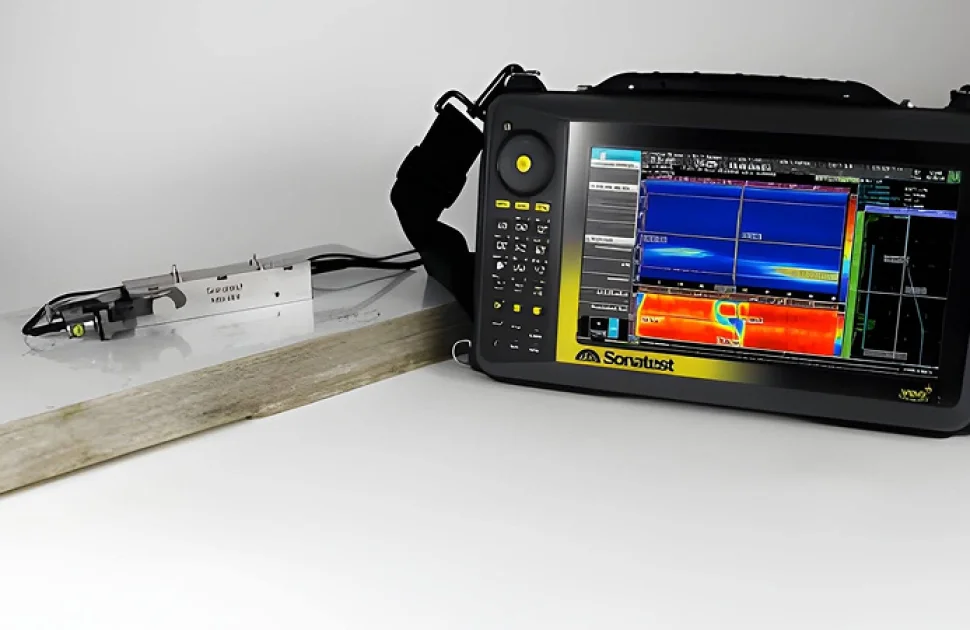
Phased array (PAUT) instruments drive multi-element array probes and fire the elements with calculated time delays, called focal laws, to steer and focus the beam electronically. They generate cross sectional images (S-scans, E-scans), and in conjunction with an encoder, store full data for later analysis. Many also have standard UT channels and are capable of executing TOFD in conjunction with PAUT.
Instruments capable of FMC/TFM are the phased array instruments that can also collect full matrix capture (FMC) data and generate total focusing method (TFM) images. TFM keeps the entire image zone in focus, which helps with characterization of difficult flaws and complex geometry, but it generates more data and needs more processing power.
A fourth tool often bought alongside these is the ultrasonic thickness gauge. It measures the remaining wall but is not a flaw detector, and as such not covered by this guide.
Selection Criteria
1. Channels and Pulser-Receiver Performance
Check the number of conventional channels on your traditional instruments. The majority of manual inspection work may be completed with a single channel; TOFD requires a pitch-catch pair, and certain procedures require multiple conventional channels operating simultaneously.
The channel count for phased array instruments is typically expressed as two numbers, like 16:64 or 32:128. The first is the active aperture, or the number of elements that may fire simultaneously. The second is the total number of elements that can be addressed by the instrument. A bigger aperture made possible by more active channels aids in focusing and thicker sections. Additionally, some codes establish a minimum. For instance, since PAUT was added to the code in 2020, AWS D1.1 has required phased array instruments with at least 16 channels; verify the number in the edition you work with.
Look beyond the headline numbers, too:
- The probes you’ll use should be covered by the frequency range. Most contact weld and plate examination uses probes between about 1 MHz and 10 MHz.
- Pulser voltage and pulse form affect penetration in thick or attenuating material.
- Receiver bandwidth, noise and digitization rate affect signal quality and the resolution of what you see on screen.
- Pulse repetition frequency limits how rapidly you can scan while still recording every position.
Ask for these values on the datasheet and, more importantly, how they were measured.
2. Phased Array and TFM Capability
If PAUT is required, make sure to verify:
- Sectorial (S-scan), linear (E-scan), and compound or combination scans are among the forms of scanning.
- The focal law’s capability: the frame rate and the number of focal laws the device can perform.
- Multi-group configurations: the ability to operate multiple PAUT groups in addition to TOFD and traditional channels in a single scan. This is important for weld inspection, as a TOFD pair and two sides are frequently required simultaneously.
- Tools for calibration include guided procedures for TCG, sensitivity (angle-corrected gain), and wedge delay.
Please make the following request if you need to use TFM:
- Post-processed or in real time? While some devices capture the FMC data and construct the image after the scan is finished, others display the TFM image in real time.
- Which wave sets (propagation modes)? The direct modes (L-L, T-T) are common modes. Through modes like TT-T, planar defects such as sidewall lack of fusion can be observed in the image.
- Frame rate and image zone size at the necessary resolution.
- Code compliance. FMC is covered in Mandatory Appendix XI of ASME Section V, Article 4, with an amplitude fidelity limit of 2 dB. Ask how the instrument helps you set a grid that meets it.
- Plane wave imaging (PWI): some instruments offer it as a faster alternative to FMC acquisition.
If you don’t require TFM today, it’s good to know if it can be upgraded to TFM with a software license or if it is a hardware replacement.
3. Encoding and Scanners
A UT inspection becomes a permanent, auditable record thanks to encoded data. Verify:
- Two axes are used for raster scans for corrosion mapping, while one axis is used for line scans along a weld.
- Compatibility refers to which scanners, crawlers, and encoders are compatible with the device and whether they are provided by a single source or multiple.
- Internal capacity, portable media, and the size of an average encoded weld file, particularly with TFM, are examples of data storage.
- Data integrity checks: whether the device detects loss of coupling, encoder slip, or missing data during a scan.
4. Software
Often software determines the productivity of a team, and that’s where many hidden costs are located.
- Onboard setup: the ease with which a technician can set up, such as part and weld geometry, probe and wedge selections, and beam coverage.
- Scan planning – determine whether coverage can be modeled and displayed visually to allow for review of the scan plan before beginning the scan.
- Analysis software – does analysis take place on the instrument, on a PC or both and is it required to have a separate license per seat?
- Code-specific tools: for example, built-in DAC, TCG and DGS for conventional work, or indication rating tools for AWS D1.1.
- Reporting and export: reporting templates, and ability to export data in open or widely readable formats. Your client or Level III may need to open the files without owning the same instrument.
- Updates: Frequency of firmware and software updates and whether they are free or paid.
Request a trial copy of the analysis software and test your data with it.
5. Ruggedness and Ergonomics
Field instruments take some abuse. Check:
- Ingress protection (IP rating) according to IEC 60529. IP65 - dust-tight, water jet proof; IP67 - dust-tight, temporary immersion proof. The two water tests are independent of each other and an instrument rated only IP67 is not necessarily tested for jets. Inquire if the rating applies with all ports and covers in use.
- The range of temperature in which it operates, particularly if you’re working outdoors in hot or cold climates.
- Drop and shock testing and to which standard.
- Weight and size, including the probes, cables, scanner and batteries you’ll be carrying.
- Screen readability in direct sunlight; control operation with gloves.
- A long battery life, and hot swapping, to prevent losing a setup while in the middle of a scan.
- Hazardous areas. If you are working in an environment where explosive atmospheres may occur please determine whether the instrument is certified for use in that environment. Many aren’t.
6. Compliance and Calibration
Your instrument has to stand up to an audit as well as to the weather.
- Calibration certificate. For conventional instruments, ask for verification to ISO 22232-1 or ASTM E317. For phased array instruments, ask about ISO 18563 or ASTM E2491.
- Linearity checks. Make sure the instrument can easily support the screen height and amplitude control linearity checks your codes require, such as those in ASME Section V, Article 4.
- Recalibration: the recommended interval, where it can be done, how long the instrument will be away, and whether a loan unit is available meanwhile.
7. Support and Total Cost of Ownership
The cost of the instrument is not the only amount you’ll spend.
- Training: what is included, hands-on (or not) and whether it discusses the techniques and software you will use.
- Local support: Location of the nearest service center, typical repair turn-around time, and loan units.
- Warranty: Terms in regard to length, what is covered and what is not.
- Licenses and options: Features that are licensed separately (e.g. TOFD, TFM, additional channels, analysis seats or code-specific tools).
- Probes and wedges: What probes, wedges, and scanners you will need and how long it takes to be available, and how much they will cost.
- Product lifecycle: Duration of the model’s hardware and software support.
Probe frequency and array configuration decide what your instrument can actually resolve. Here’s the complete guide to selecting PAUT probes for your application.
→ Read: PAUT Probes Selection Guide
Comparison Table
Criterion | Conventional flaw detector | PAUT instrument | FMC/TFM-capable instrument |
|---|---|---|---|
Techniques | Pulse-echo, dual-element; some support TOFD | PAUT; many also offer conventional UT and TOFD | PAUT plus FMC/TFM; usually conventional UT and TOFD too |
Display | A-scan | A-scan, S-scan, E-scan, C-scan | As PAUT, plus TFM images |
Channels | Usually one or two conventional channels | Phased array channels such as 16:64 or 32:128, plus conventional channels | Similar to PAUT; more active channels help FMC |
Encoding | Optional on some models | Standard | Standard |
Permanent data record | Limited unless encoded | Yes, with encoder | Yes, with encoder; much larger files |
Code coverage | Manual UT under most codes | Manual and encoded PAUT under major codes, including UT in lieu of RT where allowed | As PAUT, plus FMC/TFM under ASME Section V and ISO standards; fewer construction codes reference TFM yet |
Software needs | Simple onboard menus | Setup, scan planning and PC analysis software | As PAUT, plus TFM settings and more processing power |
Training needed | Standard UT Level I/II | PAUT-specific training | PAUT and TFM-specific training |
Relative cost | Lowest | Moderate to high | Highest |
Best for | Manual weld checks, laminations, spot inspections, small teams | Encoded weld inspection, corrosion mapping, radiography replacement | Characterizing difficult flaws, early-stage damage and complex geometry |
Questions to Ask Every Vendor
Put the same questions to every vendor and get the answers in writing. That way you’re comparing like with like.
Capability
- What are the techniques that this configuration offers today, and which are tools not included in the configuration but are licensed separately?
- How many channels are there (conventional and phased array) and what is the active aperture?
- Is it possible to use PAUT and TOFD in addition to conventional channels in the same scan?
- Does it have TFM, live or post-processed, which wave sets does it support, and at what frame rate at the resolution I want?
- Is it upgradeable to more channels or is it upgradeable to TFM – by license, by hardware?
Compliance
- What are some of the codes and standards that you have used this for and can you give some examples of procedures or setups that you have used?
- What is the calibration certificate and to what standard?
- How does the instrument help with the linearity checks and calibration verifications which my codes need?
Software and Data
- Is the analysis software licensed per seat, per instrument or free?
- What file formats can I export and will a client be able to open the data without purchasing your software?
- How frequently are software and firmware updated and are updates free?
Field Use
- What is the IP rating, and does it apply with ports in use? To what drop or shock standard has it been tested?
- What is the real battery life during a typical PAUT scan, and can batteries be swapped without shutting down?
- Is the instrument certified for use in hazardous areas?
Support and Cost
- What training is included, and does it cover my techniques and codes?
- Where is the nearest service center, what is a typical repair turnaround, and do you provide loan units?
- What does the warranty cover, and for how long?
- What is the full cost of the configuration I need, including probes, wedges, scanner, encoder, software and training?
- How long will this model be supported with parts and updates?
- Can we run a trial on our own parts before we buy?
Common Buying Mistakes
- Purchasing more than is required for the job. A complete TFM system is wasted on a team doing manual weld checks under a code which doesn’t require any more.
- Buying less capability than your clients need. If your clients increasingly ask for encoded data or UT in lieu of RT, a manual-only instrument will limit the work you can win.
- Overlooking the hidden costs. Software licenses, accessories and training can add up to more than the hardware price over the instrument’s life. Price them in from the start, using criteria 4 and 7.
- Skipping the demonstration. Insist on a trial with your own samples before you buy.
Conclusion
The best UT flaw detector isn’t the one with the greatest feature list; it’s the one that works for your work, your codes, and your team. Determine the methods, codes, and deliverables you require first. Use the comparison table to select the appropriate category and the criteria in this guide to refine the field. After that, ask each vendor the same questions, obtain written responses, and test the instruments that made the short list on your own parts before making a purchase. In this manner, you will have an instrument that your clients trust and your technicians utilize on a daily basis.


There are no comments yet!